
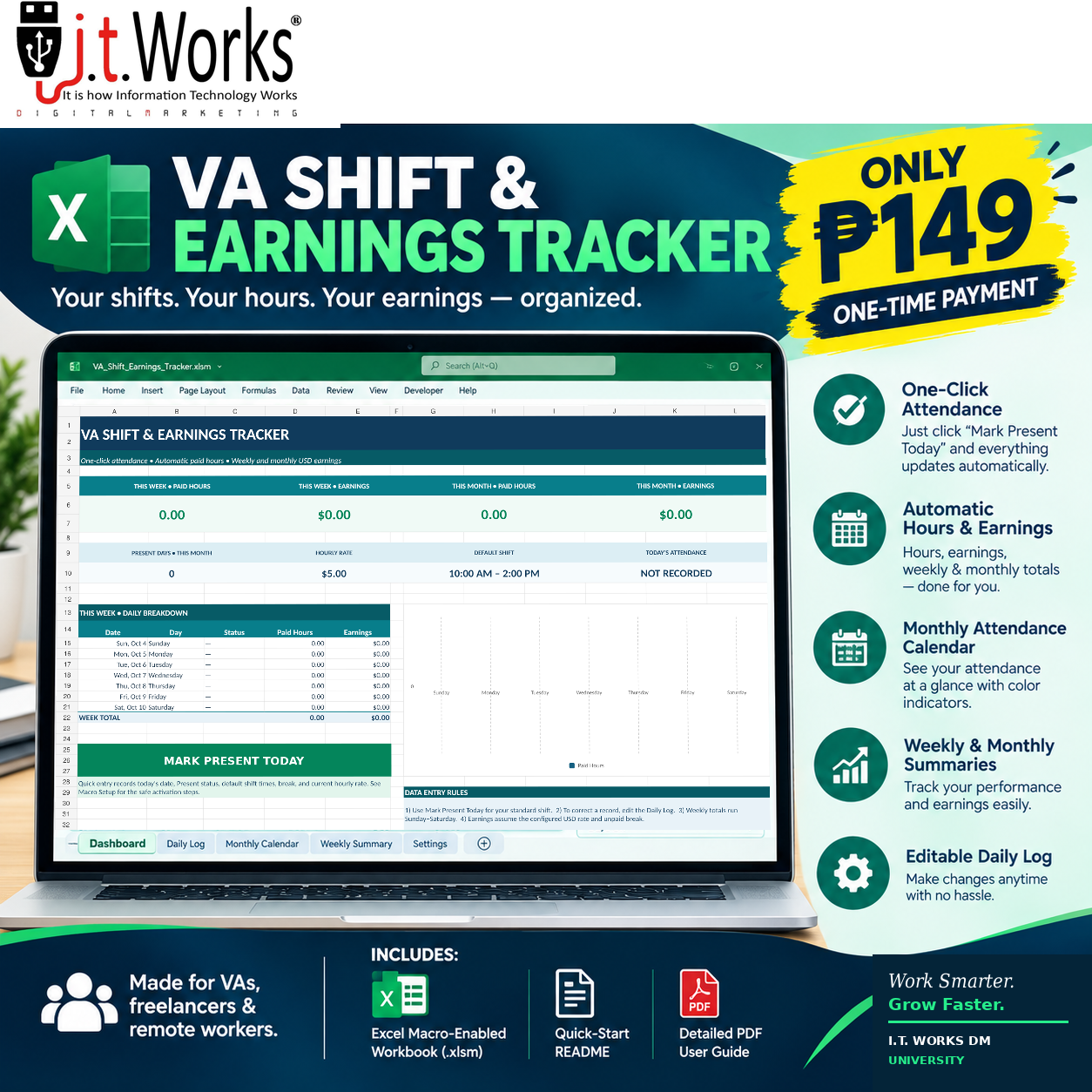
VA SHIFT & EARNINGS TRACKER
Your shifts. Your hours. Your earnings — organized.
Make your daily work tracking easier with the VA Shift & Earnings Tracker by I.T. Works DM University.
Designed for virtual assistants, freelancers, remote workers, and independent professionals, this Excel-based productivity application brings attendance tracking, working-hour calculations, and earnings summaries together in one convenient dashboard.
Spend less time recording and calculating your work hours manually. Keep your records organized and see your progress throughout the week and month.
WHAT CAN YOU DO WITH THE TRACKER?
1. One-Click Attendance
Record your attendance using the MARK PRESENT TODAY button. The application records the date and your configured shift details in the Daily Log.
A duplicate-date check helps prevent accidentally adding another attendance entry for the same date.
2. Automatic Working-Hour Calculations
Calculate working hours using your recorded start time, end time, and unpaid break duration.
3. Automatic Earnings Calculations
Set your hourly rate and let the workbook calculate estimated earnings based on your recorded paid hours.
The default example is $5 per hour, with a 10:00 AM–2:00 PM shift and no unpaid break. You can change these settings to match your own schedule and pay arrangement.
4. Monthly Attendance Calendar
View your attendance in a calendar layout. Use the selected month to review your recorded workdays and other attendance statuses.
5. Weekly Summary
Review recorded working hours and estimated earnings for a selected Sunday–Saturday reporting week.
6. Monthly Summary
Review your monthly working hours, estimated earnings, and attendance totals. Change the reporting year to review another period, subject to the records available in your workbook.
7. Editable Daily Log
Review and correct your shift records when needed. The Daily Log serves as the main record source for the dashboard and reports.
8. Customizable Settings
Adjust your hourly rate, default shift start and end times, and unpaid break duration to suit your working arrangement.
WHAT’S INCLUDED?
Your digital download package includes:
- VA Shift & Earnings Tracker (.xlsm) — the complete macro-enabled Excel workbook with the attendance button
- README_FIRST.txt — first-time setup and installation instructions
- Detailed User Guide (PDF) — instructions for every worksheet, monthly and weekly reporting, settings, and troubleshooting
- Desktop Shortcut Instructions — steps for creating a convenient desktop shortcut
- Macro Setup Guidance — instructions for handling Excel security prompts and resolving common macro issues
The supplied application is intended to be ready for use after the required first-time setup. You should not need to build the dashboard or create the attendance button yourself.
WHO IS THIS FOR?
- Virtual assistants
- Freelancers and independent contractors
- Remote employees who want personal work records
- Online professionals who track hourly work
- Individuals who want a simple attendance and earnings spreadsheet
SYSTEM REQUIREMENTS
- A Windows computer
- Desktop Microsoft Excel capable of running VBA macros
- Permission to run the workbook’s VBA macro
- Basic familiarity with opening and saving Excel files
Important: Excel for the web cannot run VBA macros. Google Sheets and mobile spreadsheet apps are not supported for the one-click attendance functionality. Use desktop Microsoft Excel on Windows for the intended experience.
Depending on your Office security settings, downloaded macro-enabled files may display a security warning or have their macros blocked. Follow the included instructions and only permit macros in a workbook obtained from a source you trust. Never enable all macros globally just to use this product.
IMPORTANT PRODUCT NOTES
This is a digital productivity tool, not a payroll-processing service. Earnings are estimates based on the records and settings you enter. The workbook does not independently verify employer payments, taxes, deductions, overtime entitlements, or contractual pay rules.
Always check your records against your actual work agreement and payments. Keep a backup copy of your workbook, especially before making extensive edits.
Digital product only. No physical item will be shipped.
ABOUT THE CREATOR
Developed for I.T. Works DM University under I.T. Works DM, a technology and digital services business focused on practical digital tools, technology education, and resources that help people work smarter.
Our mission is to make useful technology and digital learning resources more accessible to virtual assistants, freelancers, learners, and digital professionals.
I.T. Works DM University
Learn. Build. Sell. Grow. Succeed.
Product support: info@itworksdm.com
© 2026 I.T. Works DM. All rights reserved.
GET ORGANIZED TODAY
For just ₱149 one-time payment, get your VA Shift & Earnings Tracker and organize your attendance, working hours, and estimated earnings in one place.
Work smarter. Track better. Grow with I.T. Works DM University.



Reviews
There are no reviews yet.